
-
EBT Blocks 🧱
-
EPT Paragraphs 🆕
-
Resources & Support
- Drupal Book
- Blog
- Case Studies
- Drupal Documentation
- JSON Drop API Documentation
- Forum
- What's New
- Download Drupal
- Contact
Canvas Palette - Make it Colorful🎨
Canvas Palette - Drag in blocks, drop in a video, add a splash of color - no design degree required.
Extra Block Types (EBT) - New Layout Builder experience❗
Extra Block Types (EBT) - styled, customizable block types: Slideshows, Tabs, Cards, Accordions and many others. Built-in settings for background, DOM Box, javascript plugins. Experience the future of layout building today.
❗Extra Paragraph Types (EPT) - New Paragraphs experience
Extra Paragraph Types (EPT) - analogical paragraph based set of modules.
GLightbox is a pure javascript lightbox (Colorbox alternative without jQuery)❗
It can display images, iframes, inline content and videos with optional autoplay for YouTube, Vimeo and even self-hosted videos.
- Home
- Drupal Book
- 9. Module development for Drupal
- 9.10. Drupal Fields API. Drupal fields in the database.
9.10.4. Drupal 8 Fields API. Drupal Formatter - display data on the page
Menu
- Install Drupal with Lando
- 1. Drupal: Basic features
- 2. Drupal: Configuration
- 3. Drupal: Site building
- 4. Drupal Commerce - Online store module for Drupal
- 5. Drupal and SEO.
- 6. Drupal: Theming
- 7. Drupal: Advanced theming
-
9. Module development for Drupal
- 9.2. What "hook" does it mean in Drupal?
- 9.3. Create a custom Drupal module. Display page programmatically.
- 9.4. Creating pages for a premium account.
- 9.5. Basic Drupal documentation api.drupal.org. How to search for Drupal API information.
- 9.6. Route with parameter.
- 9.7. Plugins in Drupal. How to add block programmatically.
- 9.8. Working with forms in Drupal. Add configuration form programmatically.
- 9.9. Configuration management in Drupal. Active, Sync configuration, transfer configurations from DEV to LIVE.
-
9.10. Drupal Fields API. Drupal fields in the database.
- 9.10.1. Drupal Fields API. Field Widget: data input fields, form for the field.
- 9.10.2. Drupal Fields API. Field Formatter: display data fields on the page
- 9.10.3. Working with fields in Drupal. Create your own field type, widget, formatter for inserting videos from Youtube.
- 9.10.4. Drupal 8 Fields API. Drupal Formatter - display data on the page
- 9.11. Drupal Entity API. Create custom Entity type. Generate Entity type using Drupal Console.
- 9.12. Event Dispatcher, custom code for certain events
- 9.13. Working with the database in Drupal
- 9.14. Writing integration with Views
- 9.15. Services and Dependency Injection.
- Drupal decoupled. Building backend on Drupal.
- Old articles
In this article we will consider Field Formatters, that allow us to edit the display of fields and display them on the page.
In past articles, we created field type Link, in this article we will look at how these fields are displayed on the page and which class is responsible for it. Each field that you add through Drupal can be displayed on the page and edit its settings on the page Manage display.
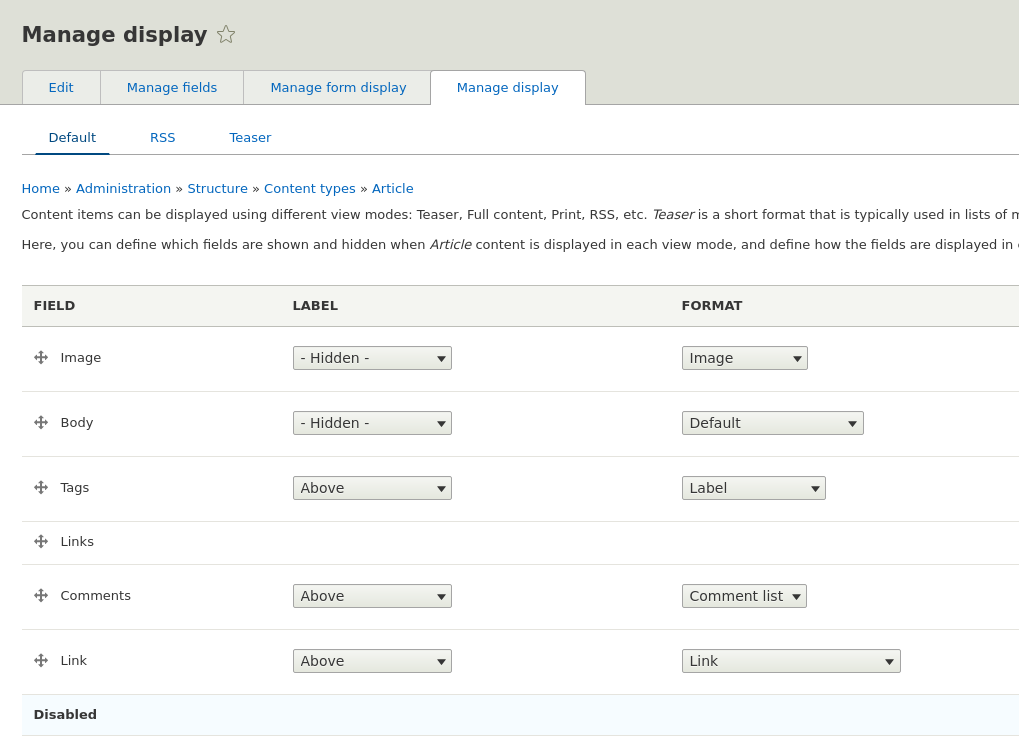
In the column Format You can choose how to display the field. This column is formed due to Field Formatter classes. Let's look at the class from the module Link, which displays the link to the page:
core/modules/link/src/Plugin/Field/FieldFormatter/LinkFormatter.php
The class annotation shows what type of field this formatter belongs to.
/**
* Plugin implementation of the 'link' formatter.
*
* @FieldFormatter(
* id = "link",
* label = @Translation("Link"),
* field_types = {
* "link"
* }
* )
*/
In this file, we are primarily interested in the method viewElements(), this method is responsible for outputting data to the page. Note that the formatter does not send requests to the database, it takes data from a variable $items. In $items