

You can download EPT Bootstrap Button from drupal.org:
https://www.drupal.org/project/ept_bootstrap_button
Or use composer:
composer require drupal/ept_bootstrap_button
EPT Bootstrap Button contains all EPT module features including DOM Box, background color / Image / Video, Edge to Edge settings:
EPT Basic Button Drupal module overview
You can download EPT Basic Button from drupal.org:
https://www.drupal.org/project/ept_basic_button
Or use composer:
composer require drupal/ept_basic_button
EPT Basic Button contains all EPT module features including DOM Box, background color / Image / Video, Edge to Edge settings:
EPT: Accordion / FAQ Drupal module overview
EPT Accordion / FAQ can be useful for pages with a lot of information, so you can collapse text paragraphs and user can expand needed text.
https://www.drupal.org/project/ept_accordion
composer require drupal/ebt_accordion
Ele usa o módulo Paragraph e é fácil editar o conteúdo do EBT Accordion.
EBT: Video module overview
Extra Block Types (EBT): Video module provides ability to add single video via Media field. it can be displayed as a thumbnail with lightbox popup.
You can download EBT Video from drupal.org:
https://www.drupal.org/project/ebt_video
composer require drupal/ebt_video
EBT Video contains all EBT module features including DOM Box, background color / Image / Video, Edge to Edge settings:
Using EPT modules you can easily set up landing pages without any HTML/CSS knowledge.
Easy to use with Paragraphs
EPT modules create paragraph types which you can use in Paragraph fields:
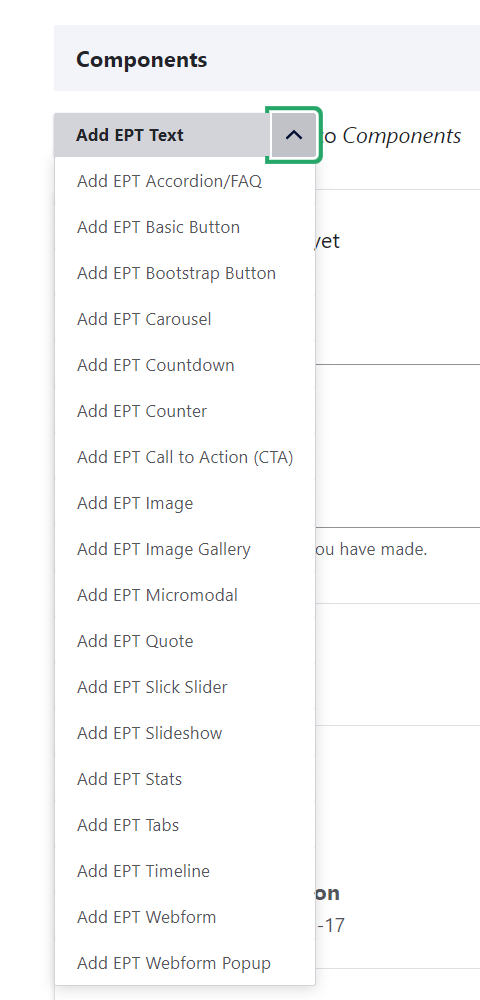
So you can add new paragraph in few click on the page.
Here is more information about Paragraph module:
Welcome to EPT's documentation. Extra Paragraph Types (EPT) modules are number of Drupal modules expired by Guttenberg, Elementor, WP Bakery page builders. In combination with Paragraphs module, these modules make it effortless to construct landing pages.
I believe you have a lot of styled custom Block types, Paragraphs types on your projects. And maybe you wanted to contribute your code to Drupal.org, but you didn't have right tool to do it quickly. Extra Block Types (EBT) provides this tool to combine your Entity Type fields, settings/options, CSS/JS and templates in solid Drupal module.
Benefits of Drupal Extra Block Types (EBT) modules for Developers:
-
Modular development approach.
-
Config driven content fields.
EBT: Webform module overview
Extra Block Types (EBT): Webform module provides ability to add a block with Webform.
https://www.drupal.org/project/ebt_webform
composer require drupal/ebt_webform
EBT Webform contains all EBT module features including DOM Box, background color / Image / Video, Edge to Edge settings: