
1.5. データベースとテンプレートを扱うクラスを接続する
私たちはフレームワークの構造を作りました。今度はデータ、つまりニュースや商品の保存について考える時です。DB を扱うオブジェクトは、次のことができる必要があります:
- DB との接続を管理する
- DB からの小さな抽象化を提供する
- クエリをキャッシュする
- DB との共通操作をより簡単にする
そのために、オブジェクト Registry/objects/db.class.php を作ります:
<?php

/**
 * DB の管理
 * DB からの小さな抽象化を提供する
 */
class database {

  /**
   * DB への複数接続を可能にする
   * めったに使わないが、時に役立つ
   */
  private $connections = array();

  /**
   * アクティブな接続を通知する
   * setActiveConnection($id) でアクティブな接続を変更できる
   */
  private $activeConnection = 0;

  /**
   * 実行され、将来のために保存されたクエリ
   */
  private $queryCache = array();

  /**
   * 取得され、将来のために保存されたデータ
   */
  private $dataCache = array();

  /**
   * 最後のクエリの記録
   */
  private $last;


  /**
   * コンストラクタ
   */
  public function __construct()
  {

  }

  /**
   * 新しい接続の作成
   * @param String database hostname
   * @param String database username
   * @param String database password
   * @param String database we are using
   * @return int the id of the new connection
   */
  public function newConnection( $host, $user, $password, $database )
  {
    $this->connections[] = new mysqli( $host, $user, $password, $database );
    $connection_id = count( $this->connections )-1;
    if( mysqli_connect_errno() )
    {
      trigger_error('Error connecting to host. '.$this->connections[$connection_id]->error, E_USER_ERROR);
    }

    return $connection_id;
  }

  /**
   * アクティブな接続を閉じる
   * @return void
   */
  public function closeConnection()
  {
    $this->connections[$this->activeConnection]->close();
  }

  /**
   * アクティブな接続を変更する
   * @param int the new connection id
   * @return void
   */
  public function setActiveConnection( int $new )
  {
    $this->activeConnection = $new;
  }

  /**
   * クエリをキャッシュに保存する
   * @param String the query string
   * @return the pointed to the query in the cache
   */
  public function cacheQuery( $queryStr )
  {
    if( !$result = $this->connections[$this->activeConnection]->query( $queryStr ) )
    {
      trigger_error('Error executing and caching query: '.$this->connections[$this->activeConnection]->error, E_USER_ERROR);
      return -1;
    }
    else
    {
      $this->queryCache[] = $result;
      return count($this->queryCache)-1;
    }
  }

  /**
   * キャッシュ内の行数を取得する
   * @param int the query cache pointer
   * @return int the number of rows
   */
  public function numRowsFromCache( $cache_id )
  {
    return $this->queryCache[$cache_id]->num_rows;
  }

  /**
   * キャッシュから行を取得する
   * @param int the query cache pointer
   * @return array the row
   */
  public function resultsFromCache( $cache_id )
  {
    return $this->queryCache[$cache_id]->fetch_array(MYSQLI_ASSOC);
  }

  /**
   * キャッシュを保存する
   * @param array the data
   * @return int the pointed to the array in the data cache
   */
  public function cacheData( $data )
  {
    $this->dataCache[] = $data;
    return count( $this->dataCache )-1;
  }

  /**
   * キャッシュからデータを取得する
   * @param int data cache pointed
   * @return array the data
   */
  public function dataFromCache( $cache_id )
  {
    return $this->dataCache[$cache_id];
  }

  /**
   * テーブルからレコードを削除する
   * @param String the table to remove rows from
   * @param String the condition for which rows are to be removed
   * @param int the number of rows to be removed
   * @return void
   */
  public function deleteRecords( $table, $condition, $limit )
  {
    $limit = ( $limit == '' ) ? '' : ' LIMIT ' . $limit;
    $delete = "DELETE FROM {$table} WHERE {$condition} {$limit}";
    $this->executeQuery( $delete );
  }

  /**
   * テーブルのレコードを更新する
   * @param String the table
   * @param array of changes field => value
   * @param String the condition
   * @return bool
   */
  public function updateRecords( $table, $changes, $condition )
  {
    $update = "UPDATE " . $table . " SET ";
    foreach( $changes as $field => $value )
    {
      $update .= "`" . $field . "`='{$value}',";
    }

    // remove our trailing ,
    $update = substr($update, 0, -1);
    if( $condition != '' )
    {
      $update .= "WHERE " . $condition;
    }

    $this->executeQuery( $update );

    return true;

  }

  /**
   * テーブルにレコードを挿入する
   * @param String the database table
   * @param array data to insert field => value
   * @return bool
   */
  public function insertRecords( $table, $data )
  {
    // setup some variables for fields and values
    $fields  = "";
    $values = "";

    // populate them
    foreach ($data as $f => $v)
    {

      $fields  .= "`$f`,";
      $values .= ( is_numeric( $v ) && ( intval( $v ) == $v ) ) ? $v."," : "'$v',";

    }

    // remove our trailing ,
    $fields = substr($fields, 0, -1);
    // remove our trailing ,
    $values = substr($values, 0, -1);

    $insert = "INSERT INTO $table ({$fields}) VALUES({$values})";
    $this->executeQuery( $insert );
    return true;
  }

  /**
   * DB へのクエリの実行
   * @param String the query
   * @return void
   */
  public function executeQuery( $queryStr )
  {
    if( !$result = $this->connections[$this->activeConnection]->query( $queryStr ) )
    {
      trigger_error('Error executing query: '.$this->connections[$this->activeConnection]->error, E_USER_ERROR);
    }
    else
    {
      $this->last = $result;
    }

  }

  /**
   * キャッシュからのクエリを除く、最後のクエリの行を取得する
   * @return array
   */
  public function getRows()
  {
    return $this->last->fetch_array(MYSQLI_ASSOC);
  }

  /**
   * 最後のクエリの行数を取得する
   * @return int the number of affected rows
   */
  public function affectedRows()
  {
    return $this->$this->connections[$this->activeConnection]->affected_rows;
  }

  /**
   * データの安全性チェック
   * @param String the data to be sanitized
   * @return String the sanitized data
   */
  public function sanitizeData( $data )
  {
    return $this->connections[$this->activeConnection]->real_escape_string( $data );
  }

  /**
   * デストラクタ、接続を閉じる
   * close all of the database connections
   */
  public function __deconstruct()
  {
    foreach( $this->connections as $connection )
    {
      $connection->close();
    }
  }
}
?>
DB への接続に移る前に、このクラスが何をするか見てみましょう。クラスのメソッドを通じて、追加・更新・削除の簡単な操作ができます:
// 挿入
$registry->getObject('db')->insertRecords( 'products', array('name'=>'マグカップ' ) );
// 更新
$registry->getObject('db')->updateRecords( 'products', array('name'=>'赤いマグカップ' ), 'ID=2' );
// 削除
$registry->getObject('db')->deleteRecords( 'products', "name='赤いマグカップ'", 5 );
また、このクラスはキャッシュもサポートしています。
では、テンプレートを管理するもう 1 つのオブジェクト Registry/objects/template.class.php を追加しましょう。
<?php

// 他の場所からのクラス呼び出しを避けるために index.php で定義された定数
if ( ! defined( 'FW' ) )
{
  echo 'このファイルは index.php からのみ呼び出せ、直接は呼び出せません';
  exit();
}

/**
 * テンプレートを扱うクラス
 */
class template {

  private $page;

  /**
   * コンストラクタ
   */
  public function __construct()
  {
    // この後、このページクラスを追加します
    include( APP_PATH . '/Registry/objects/page.class.php');
    $this->page = new Page();

  }

  /**
   * ページにタグを追加する
   * @param String $tag テンプレートを挿入するタグ、例えば {hello}
   * @param String $bit テンプレートへのパス
   * @return void
   */
  public function addTemplateBit( $tag, $bit )
  {
    if( strpos( $bit, 'Views/' ) === false )
    {
      $bit = 'Views/Templates/' . $bit;
    }
    $this->page->addTemplateBit( $tag, $bit );
  }

  /**
   * テンプレートをページに組み込む
   * ページのコンテンツを更新する
   * @return void
   */
  private function replaceBits()
  {
    $bits = $this->page->getBits();
    foreach( $bits as $tag => $template )
    {
      $templateContent = file_get_contents( $template );
      $newContent = str_replace( '{' . $tag . '}', $templateContent, $this->page->getContent() );
      $this->page->setContent( $newContent );
    }
  }

  /**
   * タグを新しいコンテンツに置き換える
   * @return void
   */
  private function replaceTags()
  {
    // タグを取得する
    $tags = $this->page->getTags();
    // タグをループする
    foreach( $tags as $tag => $data )
    {
      if( is_array( $data ) )
      {

        if( $data[0] == 'SQL' )
        {
          // キャッシュされたクエリからタグを置き換える
          $this->replaceDBTags( $tag, $data[1] );
        }
        elseif( $data[0] == 'DATA' )
        {
          // キャッシュされたデータからタグを置き換える
          $this->replaceDataTags( $tag, $data[1] );
        }
      }
      else
      {
        // タグをコンテンツに置き換える
        $newContent = str_replace( '{' . $tag . '}', $data, $this->page->getContent() );
        // ページの内容を更新する
        $this->page->setContent( $newContent );
      }
    }
  }

  /**
   * DB のデータでタグを置き換える
   * @param String $tag タグ(トークン)
   * @param int $cacheId クエリの ID
   * @return void
   */
  private function replaceDBTags( $tag, $cacheId )
  {
    $block = '';
    $blockOld = $this->page->getBlock( $tag );

    // 各クエリについてキャッシュを確認する...
    while ($tags = Registry::getObject('db')->resultsFromCache( $cacheId ) )
    {
      $blockNew = $blockOld;
      // 新しいブロックを作り、タグの代わりに挿入する
      foreach ($tags as $ntag => $data)
      {
        $blockNew = str_replace("{" . $ntag . "}", $data, $blockNew);
      }
      $block .= $blockNew;
    }
    $pageContent = $this->page->getContent();
    // テンプレートから区切りを削除し、HTML を整える
    $newContent = str_replace( '<!-- START ' . $tag . ' -->' . $blockOld . '<!-- END ' . $tag . ' -->', $block, $pageContent );
    // ページのコンテンツを更新する
    $this->page->setContent( $newContent );
  }

  /**
   * タグの代わりにページのコンテンツを置き換える
   * @param String $tag タグ
   * @param int $cacheId キャッシュ内のデータの ID
   * @return void
   */
  private function replaceDataTags( $tag, $cacheId )
  {
    $block = $this->page->getBlock( $tag );
    $blockOld = $block;
    while ($tags = Registry::getObject('db')->dataFromCache( $cacheId ) )
    {
      foreach ($tags as $tag => $data)
      {
        $blockNew = $blockOld;
        $blockNew = str_replace("{" . $tag . "}", $data, $blockNew);
      }
      $block .= $blockNew;
    }
    $pageContent = $this->page->getContent();
    $newContent = str_replace( $blockOld, $block, $pageContent );
    $this->page->setContent( $newContent );
  }

  /**
   * ページを取得する
   * @return Object
   */
  public function getPage()
  {
    return $this->page;
  }

  /**
   * テンプレートの数に応じてページのコンテンツを設定する
   * テンプレートへのパスを渡す
   * @return void
   */
  public function buildFromTemplates()
  {
    $bits = func_get_args();
    $content = "";
    foreach( $bits as $bit )
    {

      if( strpos( $bit, 'skins/' ) === false )
      {
        $bit = 'Views/Templates/' . $bit;
      }
      if( file_exists( $bit ) == true )
      {
        $content .= file_get_contents( $bit );
      }

    }
    $this->page->setContent( $content );
  }

  /**
   * Convert an array of data (i.e. a db row?) to some tags
   * @param array the data
   * @param string a prefix which is added to field name to create the tag name
   * @return void
   */
  public function dataToTags( $data, $prefix )
  {
    foreach( $data as $key => $content )
    {
      $this->page->addTag( $key.$prefix, $content);
    }
  }

  public function parseTitle()
  {
    $newContent = str_replace('<title>', '<title>'. $this->$page->getTitle(), $this->page->getContent() );
    $this->page->setContent( $newContent );
  }

  /**
   * タグとトークン、タイトルを差し込む
   * @return void
   */
  public function parseOutput()
  {
    $this->replaceBits();
    $this->replaceTags();
    $this->parseTitle();
  }

}
?>
また、テンプレートエンジンで Page オブジェクトを呼び出すよう定義したので、それを定義する必要があります。Registry/objects/page.class.php:
<?php

/**
 * ページ用のクラス
 * このクラスは、私たちに必要ないくつかのものを追加できるようにする
 * 例えば:パスワード保護されたページ、js/css ファイルの追加など
 */
class page {

  private $css = array();
  private $js = array();
  private $bodyTag = '';
  private $bodyTagInsert = '';

  // 将来の機能
  private $authorised = true;
  private $password = '';

  // ページの要素
  private $title = '';
  private $tags = array();
  private $postParseTags = array();
  private $bits = array();
  private $content = "";

  /**
   * Constructor...
   */
  function __construct() { }

  public function getTitle()
  {
    return $this->title;
  }

  public function setPassword( $password )
  {
    $this->password = $password;
  }

  public function setTitle( $title )
  {
    $this->title = $title;
  }

  public function setContent( $content )
  {
    $this->content = $content;
  }

  public function addTag( $key, $data )
  {
    $this->tags[$key] = $data;
  }

  public function getTags()
  {
    return $this->tags;
  }

  public function addPPTag( $key, $data )
  {
    $this->postParseTags[$key] = $data;
  }

  /**
   * タグを解析する
   * @return array
   */
  public function getPPTags()
  {
    return $this->postParseTags;
  }

  /**
   * タグを追加する
   * @param String the tag where the template is added
   * @param String the template file name
   * @return void
   */
  public function addTemplateBit( $tag, $bit )
  {
    $this->bits[ $tag ] = $bit;
  }

  /**
   * すべてのタグを取得する
   * @return array the array of template tags and template file names
   */
  public function getBits()
  {
    return $this->bits;
  }

  /**
   * ページ上のすべてのブロックを探す
   * @param String the tag wrapping the block ( <!-- START tag --> block <!-- END tag --> )
   * @return String the block of content
   */
  public function getBlock( $tag )
  {
    preg_match ('#<!-- START '. $tag . ' -->(.+?)<!-- END '. $tag . ' -->#si', $this->content, $tor);

    $tor = str_replace ('<!-- START '. $tag . ' -->', "", $tor[0]);
    $tor = str_replace ('<!-- END '  . $tag . ' -->', "", $tor);

    return $tor;
  }

  public function getContent()
  {
    return $this->content;
  }

}
?>
DB とテンプレートを扱うクラスを作ったので、これらのクラスを接続しましょう。
Registry/registry.class.php にメソッド storeCoreObjects() を作ります:
    public function storeCoreObjects()
    {
      $this->storeObject('database', 'db' );
      $this->storeObject('template', 'template' );
    }
ここに、どのクラスの接続が行われるかを書いていきます。
もう少しデータを入れておきましょう。具体的には users テーブルを作ります。このテーブルには id、name、email の 3 つのフィールドがあります。例として、データベースの sql ファイルを git に添付します。
では、メインページを表示してみましょう。そのためにテンプレート Views/Templates/main.tpl.php を作る必要があります:
<html>
<head>
    <title> Powered by PCA Framework</title>
</head>
<body>
<h1>Our Members</h1>
<p>Below is a list of our members:</p>
<ul>
<!-- START members -->
<li>{name} {email}</li>
<!-- END members -->
</ul>
</body>
</html>
ご覧のとおり、タグ members とトークン {name}、{email} の出力を設定しました。テンプレートエンジンの動作は、いずれかの記事で詳しく取り上げると思います。では index.php に戻り、テンプレートとデータベースを接続しましょう。
これで、私たちの index.php は次のようになります:
<?php
/**
 * Framework
 * Framework loader - 私たちのフレームワークへのエントリーポイント
 *
 */

// セッションを開始する
session_start();

error_reporting(E_ALL);
// いくつかの定数を設定する
// どのスクリプトからでも簡単に取得できるよう、フレームワークのルートを設定する
define( "APP_PATH", dirname( __FILE__ ) ."/" );
// 私たちのフレームワーク以外からのスクリプト呼び出しを避けるためにこれを使う
define( "FW", true );

/**
 * オートロードのマジック関数
 * 必要なときに必要な -controller- を呼び出せるようにする
 * @param String the name of the class
 */
function __autoload( $class_name )
{
    require_once('Controllers/' . $class_name . '/' . $class_name . '.php' );
}

// 私たちのレジストリを接続する
require_once('Registry/registry.class.php');
$registry = Registry::singleton();


// レジストリクラスにすべてのオブジェクトのリストを保持する
$registry->storeCoreObjects();

// ここにあなたの DB アクセス情報を入れる
$registry->getObject('db')->newConnection('localhost', 'root', '', 'framework');

// メインページのテンプレートを接続する
$registry->getObject('template')->buildFromTemplates('main.tpl.php');

// users テーブルへクエリを行う
$cache = $registry->getObject('db')->cacheQuery('SELECT * FROM users');

// テンプレートで呼び出すために users タグを追加する。
// このタグでは、トークン {name}、{email} を通じてテーブルのフィールドが利用できる
$registry->getObject('template')->getPage()->addTag('users', array('SQL', $cache) );

// ページのタイトルを設定する
$registry->getObject('template')->getPage()->setTitle('Our users');

// タグとトークンを探してページを解析し、ページを出力する
$registry->getObject('template')->parseOutput();
print $registry->getObject('template')->getPage()->getContent();

// すべて動作していることを確認するためにフレームワーク名を出力する
print $registry->getFrameworkName();

exit();

?>
すべてうまくいき、データベースにユーザーがいれば、次のようなものが出力されるはずです:
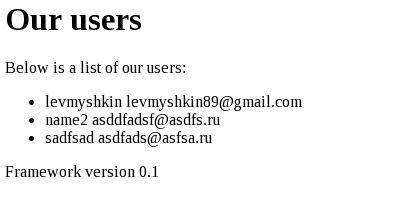
何かうまくいかずエラーが出た場合は、前の記事のコードをまだ直していないかもしれません。動作するコードを GitHub で見ることができます。
これが、記事を書く過程で私に起きたエラーです。
DB を扱うクラスの名前を変更する Registry/objects/db.class.php:
Index: Registry/objects/db.class.php
IDEA additional info:
Subsystem: com.intellij.openapi.diff.impl.patch.CharsetEP
<+>UTF-8
===================================================================
--- Registry/objects/db.class.php	(revision b1ffa3bbfce4e95ace7ed735e9412e9332e17d50)
+++ Registry/objects/db.class.php	(revision )
@@ -4,7 +4,7 @@
  * Управление БД
  * Предоставляет небольшую абстракцию от БД
  */
-class database {
+class db {

   /**
    * Позволяет множественное подключение к БД
\ No newline at end of file
必要なところで静的クラスを定義し、DB を扱うクラスの名前を変更する Registry/registry.class.php:
Index: Registry/registry.class.php
IDEA additional info:
Subsystem: com.intellij.openapi.diff.impl.patch.CharsetEP
<+>UTF-8
===================================================================
--- Registry/registry.class.php	(revision b1ffa3bbfce4e95ace7ed735e9412e9332e17d50)
+++ Registry/registry.class.php	(revision )
@@ -69,15 +69,15 @@
      * @param String $key the key for the array
      * @return void
      */
-    public function storeObject( $object, $key )
+    public static function storeObject( $object, $key )
     {
-        require_once('objects/' . $object . '.class.php');
+        require_once('Registry/objects/' . $object . '.class.php');
         self::$objects[ $key ] = new $object( self::$instance );
     }

     public function storeCoreObjects()
     {
-      $this->storeObject('database', 'db' );
+      $this->storeObject('db', 'db' );
       $this->storeObject('template', 'template' );
     }

@@ -86,7 +86,7 @@
      * @param String $key the array key
      * @return object
      */
-    public function getObject( $key )
+    public static function getObject( $key )
     {
         if( is_object ( self::$objects[ $key ] ) )
         {
\ No newline at end of file
db.php を持つコントローラー db を作る必要がありました。
Controllers/db/
Controllers/db/db.php
テンプレートエンジンのエラーを修正しました Registry/objects/template.class.php:
Index: Registry/objects/template.class.php
IDEA additional info:
Subsystem: com.intellij.openapi.diff.impl.patch.CharsetEP
<+>UTF-8
===================================================================
--- Registry/objects/template.class.php	(revision b1ffa3bbfce4e95ace7ed735e9412e9332e17d50)
+++ Registry/objects/template.class.php	(revision )
@@ -194,7 +194,7 @@

   public function parseTitle()
   {
-    $newContent = str_replace('<title>', '<title>'. $this->$page->getTitle(), $this->page->getContent() );
+    $newContent = str_replace('<title>', '<title>'. $this->page->getTitle(), $this->page->getContent() );
     $this->page->setContent( $newContent );
   }

\ No newline at end of file