
9.8.2. Drupal でのマルチステップポップアップフォーム
この記事では、引き続き Drupal 8 の Form API を理解し、マルチステップフォームを作ります。すでにモジュール用の通常の構成フォームを作成しました。マルチステップフォームは、フォームのステップ間でデータを保存するために $form_state を使って、同様の方法で作成されます。
コード例は github で見られます:
https://github.com/levmyshkin/drupalbook8
マルチステップフォームには、フォームクラスを追加する必要があります:
/modules/custom/drupalbook/src/Form/MultiStepForm.php
<?php

/**
 * @file
 * Contains Drupal\drupalbook\Form\MultiStepForm.
 */

namespace Drupal\drupalbook\Form;

use Drupal\Core\Form\FormBase;
use Drupal\Core\Form\FormStateInterface;

class MultiStepForm extends FormBase
{

  protected $step = 1;

  /**
   * {@inheritdoc}
   */
  protected function getEditableConfigNames()
  {
  }

  /**
   * {@inheritdoc}
   */
  public function getFormID()
  {
    return 'multi_step_form';
  }

  /**
   * {@inheritdoc}
   */
  public function buildForm(array $form, FormStateInterface $form_state)
  {
    //$form = parent::buildForm($form, $form_state);

    // Add a wrapper div that will be used by the Form API to update the form using AJAX
    $form['#prefix'] = '<div id="ajax_form_multistep_form">';
    $form['#suffix'] = '</div>';
    if ($this->step == 1) {
      $form['message-step'] = [
        '#markup' => '<div class="step">' . $this->t('Step 1 of 2') . '</div>',
      ];
      $form['message-title'] = [
        '#markup' => '<h2>' . $this->t('Who are you?') . '</h2>',
      ];
      $form['first_name'] = [
        '#type' => 'textfield',
        '#title' => $this->t('First name'),
        '#placeholder' => $this->t('First name'),
        '#required' => TRUE,
      ];
      $form['last_name'] = [
        '#type' => 'textfield',
        '#title' => $this->t('Last name'),
        '#placeholder' => $this->t('Last name'),
        '#required' => TRUE,
      ];

    }

    if ($this->step == 2) {
      $form['message-step'] = [
        '#markup' => '<div class="step">' . $this->t('Step 2 of 2') . '</div>',
      ];
      $form['message-title'] = [
        '#markup' => '<h2>' . $this->t('Please enter your contact details below:') . '</h2>',
      ];
      $form['phone'] = [
        '#type' => 'textfield',
        '#title' => $this->t('Phone'),
        '#placeholder' => $this->t('Phone'),
        '#required' => TRUE,
      ];
      $form['email'] = [
        '#type' => 'email',
        '#title' => $this->t('Email address'),
        '#placeholder' => $this->t('Email address'),
        '#attributes' => array('class' => array('mail-first-step')),
        '#required' => TRUE,
      ];
      $form['subscribe'] = [
        '#type' => 'checkbox',
        '#title' => $this->t('Subscribe to newsletter'),
      ];
      $form['agree'] = [
        '#markup' => '<p class="agree">' . $this->t(' By signing up you agree to the <a href="@terms">Terms and Conditions</a> and <a href="@policy">Privacy Policy</a>',
            array('@terms' => '/terms-and-conditions', '@policy' => '/privacy-policy')) . '</p>',
      ];
    }

    if ($this->step == 3) {
      $form['message-step'] = [
        '#markup' => '<p class="complete">' . $this->t('- Complete -') . '</p>',
      ];
      $form['message-title'] = [
        '#markup' => '<h2>' . $this->t('Thank you') . '</h2>',
      ];

    }

    if ($this->step == 1) {
      $form['buttons']['forward'] = array(
        '#type' => 'submit',
        '#value' => t('Next'),
        '#prefix' => '<div class="step1-button">',
        '#suffix' => '</div>',
        '#ajax' => array(
          // We pass in the wrapper we created at the start of the form
          'wrapper' => 'ajax_form_multistep_form',
          // We pass a callback function we will use later to render the form for the user
          'callback' => '::ajax_form_multistep_form_ajax_callback',
          'event' => 'click',
        ),
      );
    }
    if ($this->step == 2) {
      $form['buttons']['forward'] = array(
        '#type' => 'submit',
        '#value' => t('Submit'),
        '#ajax' => array(
          // We pass in the wrapper we created at the start of the form
          'wrapper' => 'ajax_form_multistep_form',
          // We pass a callback function we will use later to render the form for the user
          'callback' => '::ajax_form_multistep_form_ajax_callback',
          'event' => 'click',
        ),
      );
    }

    $form['#attached']['library'][] = 'drupalbook/multistep_form';
    return $form;
  }

  /**
   * {@inheritdoc}
   */
  public function validateForm(array &$form, FormStateInterface $form_state) {
    return parent::validateForm($form, $form_state);
  }

  /**
   * {@inheritdoc}
   */
  public function submitForm(array &$form, FormStateInterface $form_state) {
    if ($this->step == 2) {
      $values = $form_state->getValues();
      $email = $values['email'];
      // Save data or send email here.
    }

    $this->step++;
    $form_state->setRebuild();
  }

  public function ajax_form_multistep_form_ajax_callback(array &$form, FormStateInterface $form_state) {
    return $form;
  }

}
次に、これらの各行が何をするかを理解します。とりあえず、フォーム用のルートを作成しましょう:
/modules/custom/drupalbook/drupalbook.routing.yml:
drupalbook.multistep_form:
  path: '/multistep-form'
  defaults:
    _form: '\Drupal\drupalbook\Form\MultiStepForm'
    _title: 'Subscribe to newsletter'
  requirements:
    _permission: 'access content'
これで /multistep-form にフォームが作成されます:
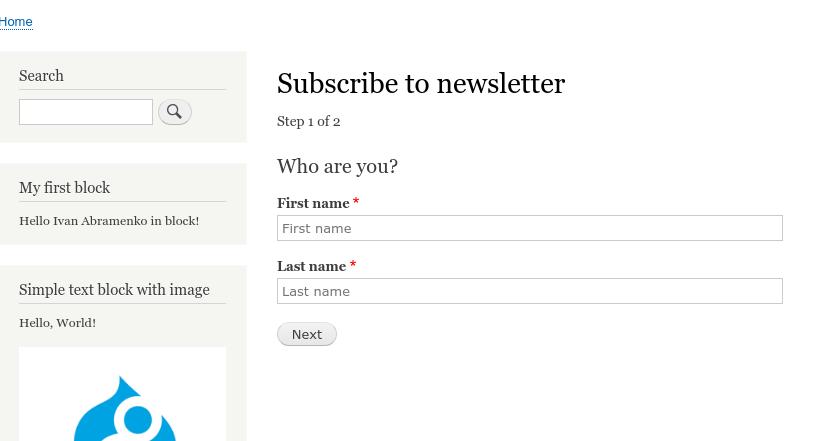
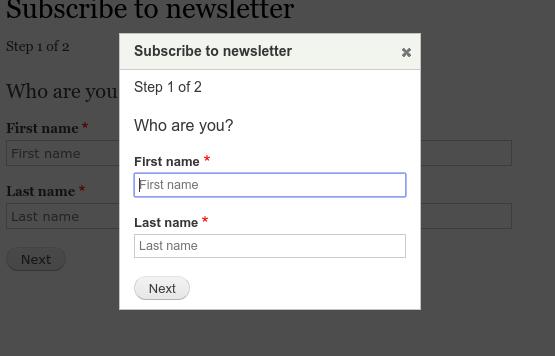
このフォームをモーダルのポップアップウィンドウで開くには、特定の use-ajax クラスと data-dialog-type="modal" 属性を持つ、フォームページへのリンク付きのブロックまたは単なるテキストを追加する必要があります。また、次のライブラリを有効にする必要があります:core/drupal.dialog.ajax、core/jquery.form。ブロックを通じてこれを行う場合、ポップアップでフォームを開くボタン用に次のコードが得られます:modules/custom/drupalbook/src/Plugin/Block/SubscribeFormButton.php
<?php

namespace Drupal\drupalbook\Plugin\Block;

use Drupal\Core\Block\BlockBase;

/**
 * Provides a button subscribe to newsletter.
 *
 * @Block(
 *   id = "drupalbook_subsribe_form_button",
 *   admin_label = @Translation("Subscribe to Newsletter"),
 * )
 */
class SubscribeFormButton extends BlockBase {
  /**
   * {@inheritdoc}
   */
  public function build() {
    $text = '<a href="/multistep-form" class="use-ajax" data-dialog-type="modal">Subscribe</a>';

    return [
      '#markup' => $text,
      '#attached' => array(
        'library' => array(
          'core/drupal.dialog.ajax',
          'core/jquery.form',
        ),
      ),
    ];
  }

}
ポップアップ内のフォームは次のように見えます:
また、drupalbook.libraries.yml ファイルからカスタムライブラリを接続しました:
modules/custom/drupalbook/drupalbook.libraries.yml
multistep_form:
  css:
    css/multistep_form.css: {}
  js:
    scripts/multistep_form.js: {}
  dependencies:
    - core/jquery
    - core/jquery.once
フォームをスタイリングし、必要な jQuery プラグインを接続する必要があります。したがって、さらにファイルを作成する必要があります:
フォームをスタイリングし、必要な jQuery プラグインを接続する必要があります。したがって、さらにファイルを作成する必要があります:
modules/custom/drupalbook/css/multistep_form.css
modules/custom/drupalbook/scripts/multistep_form.js
コード例は github で見られます:
https://github.com/levmyshkin/drupalbook8