
Scroll
設定フォームの操作
フォームコンテキストで$configを使用する
設定フォームを使用して、$configがユーザー入力データを取得し、{module}.settings.ymlファイル内のデータを変更する方法を確認できます。フォームで$configオブジェクトを宣言するコードは、フォーム設定のPHPファイルにあります。
DrupalコアのConfigFactoryクラスは、設定データの読み書き方法であり、指定された設定ファイルの内容に基づいてConfigオブジェクトのインスタンスを作成するために使用されます。新しいConfigオブジェクトは、そのデータに対してCRUD操作を実行するために使用できます。
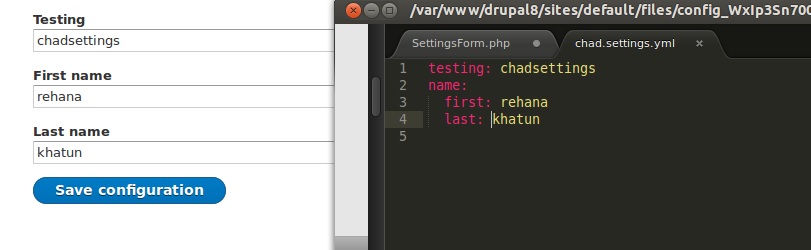
フォーム定義の例(example/src/Form/exampleSettingsForm.phpにあります):
namespace Drupal\example\Form;

use Drupal\Core\Form\ConfigFormBase;
use Drupal\Core\Form\FormStateInterface;

/**
 * Configure example settings for this site.
 */
class ExampleSettingsForm extends ConfigFormBase {

  /**
   * Config settings.
   *
   * @var string
   */
  const SETTINGS = 'example.settings';

  /**
   * {@inheritdoc}
   */
  public function getFormId() {
    return 'example_admin_settings';
  }

  /**
   * {@inheritdoc}
   */
  protected function getEditableConfigNames() {
    return [
      static::SETTINGS,
    ];
  }

  /**
   * {@inheritdoc}
   */
  public function buildForm(array $form, FormStateInterface $form_state) {
    $config = $this->config(static::SETTINGS);

    $form['example_thing'] = [
      '#type' => 'textfield',
      '#title' => $this->t('Things'),
      '#default_value' => $config->get('example_thing'),
    ];

    $form['other_things'] = [
      '#type' => 'textfield',
      '#title' => $this->t('Other things'),
      '#default_value' => $config->get('other_things'),
    ];

    return parent::buildForm($form, $form_state);
  }

  /**
   * {@inheritdoc}
   */
  public function submitForm(array &$form, FormStateInterface $form_state) {
    // Retrieve the configuration.
    $this->configFactory->getEditable(static::SETTINGS)
      // Set the submitted configuration setting.
      ->set('example_thing', $form_state->getValue('example_thing'))
      // You can set multiple configurations at once by making
      // multiple calls to set().
      ->set('other_things', $form_state->getValue('other_things'))
      ->save();

    parent::submitForm($form, $form_state);
  }

}
ルーティングファイル(example.routing.yml):
example.settings:
  path: '/admin/config/example/settings'
  defaults:
    _form: '\Drupal\example\Form\ExampleSettingsForm'
    _title: 'example'
  requirements:
    _permission: 'administer site configuration'
Configオブジェクトを使用すると、フォームから収集したデータを簡素化できます。フォーム設定ファイルに上記のコードを入れておくと、フォームデータを{module}.settings.ymlに保存できます。
ConfigFormBaseを拡張するクラスは、getEditableConfigNamesメソッドを実装し、編集する設定フィールド名の配列を返す必要があります。