
Rohingya ဘါသာစကားအတွက် Drupal ကို ဘါသာပြန်ဆိုနည်း
Drupal ဘါသာပြန်ဆိုခြင်း စာမျက်နှာသို့ ပြန်သွားရန်
Drupal ကို install လုပ်စဉ်မှာ မိမိဘါသာစကားကို ရွေးချယ်နိုင်ပြီး Drupal က interface အတွက် ဘါသာပြန်ဆိုချက်များကို အလိုအလျောက် download လုပ်ပေးပါလိမ့်မယ်။ ဒါပေမယ့် ဘါသာစကားအများစုမှာ interface အတွက် လိုအပ်သော ဘါသာပြန်ဆိုချက်အားလုံး မရှိသေးတာကို တွေ့နိုင်ပါတယ်။
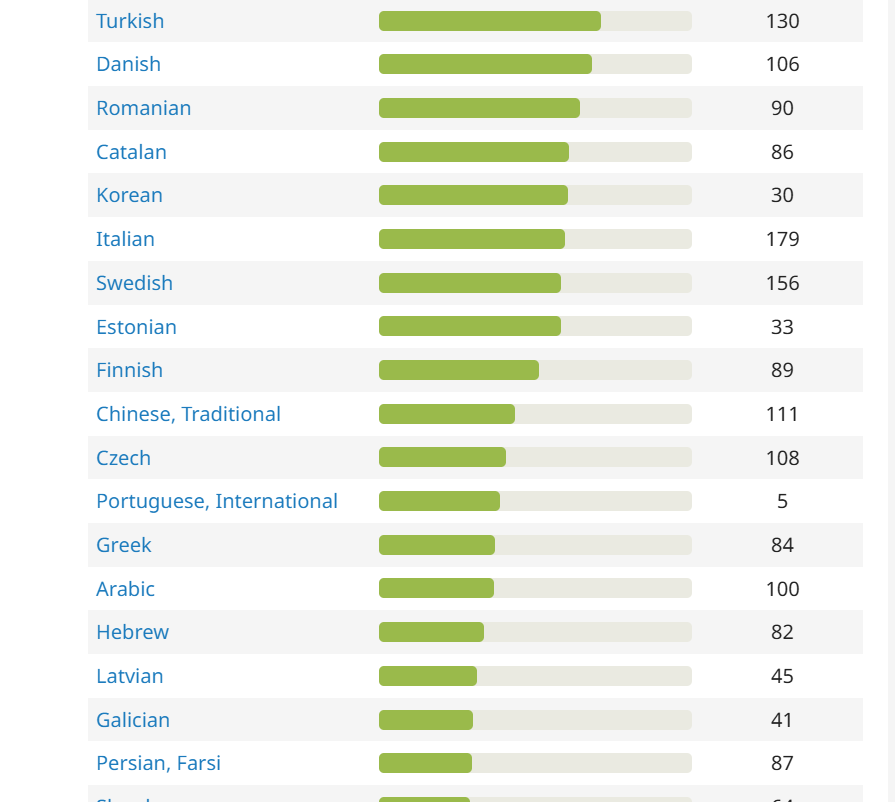
ဘါသာပြန်ဆိုချက်အချို့ကို ရရှိမည်ဖြစ်သော်လည်း ကျန်ရှိသော ဘါသာပြန်ဆိုချက်များကိုတော့ .po ဖိုင်မှ ကိုယ်တိုင် import လုပ်ရပါမည် (Ctrl + S ဖြင့် ဤဖိုင်ကို သိမ်းဆည်းပါ)။
ဘါသာပြန်ဆိုချက်များပါသော .po ဖိုင်ကို Download လုပ်ရန်
ပထမဦးစွာ Drupal site ပေါ်တွင် မိမိ၏ ဘါသာစကား ရှိကြောင်း စစ်ဆေးပါ။
/admin/config/regional/language
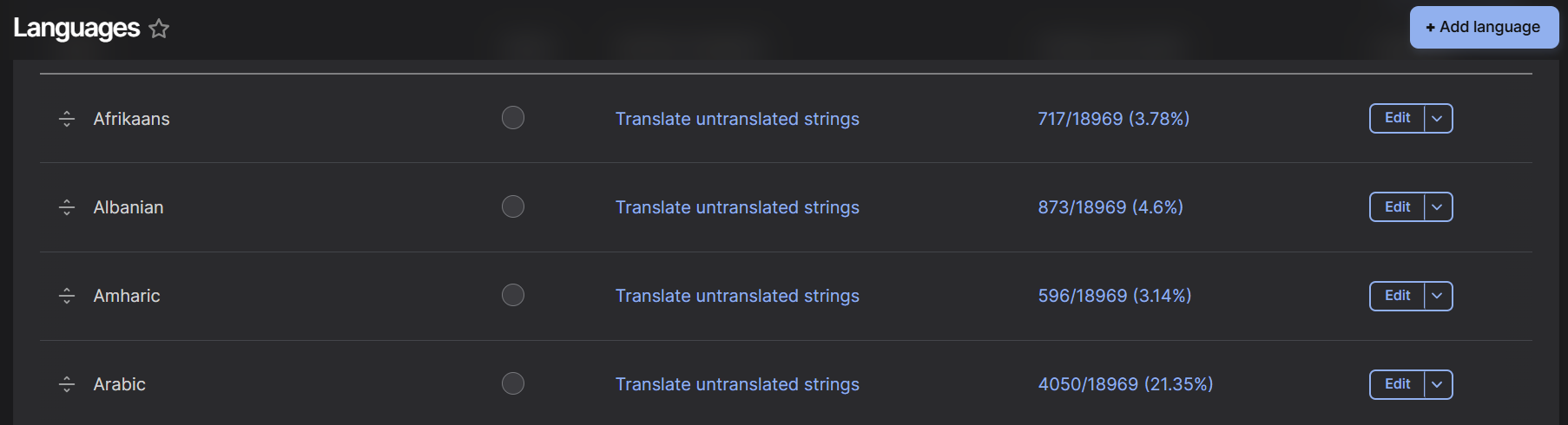
မိမိ၏ ဘါသာစကား မရှိပါက Add Language ခလုတ်ကို နှိပ်ပြီး ထည့်သွင်းနိုင်ပါသည်။
ဤစာမျက်နှာ မရှိပါက Language နှင့် Configuration Translation modules များကို enable လုပ်ရန် လိုအပ်ပါသည်။
/admin/modules

.po ဖိုင်ကို download လုပ်ပြီး မိမိ၏ ဘါသာစကားကို site တွင် ထည့်ထားပြီးနောက် Import စာမျက်နှာသို့ သွားကာ .po ဖိုင်ကို upload လုပ်ပြီး မိမိ၏ ဘါသာစကားကို ရွေးချယ်ပါ (Configuration > Region and language > User interface translation > Import)။
/admin/config/regional/translate/import
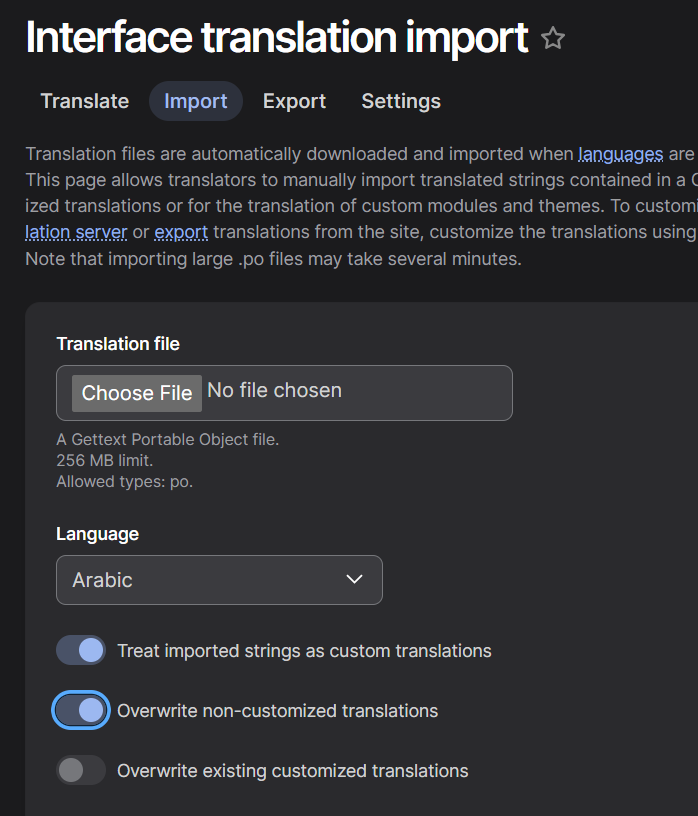
ထို့နောက် interface ကို မိမိ၏ ဘါသာစကားဖြင့် ဘါသာပြန်ဆိုထားသည်ကို မြင်တွေ့ရပါလိမ့်မည်။
ထပ်မံကြည့်ရှုရန်
Drupal ဘါသာပြန်ဆိုခြင်း စာမျက်နှာသို့ ပြန်သွားရန်
https://github.com/levmyshkin/localize-drupal - ဘါသာစကားအားလုံးအတွက် နောက်ဆုံး .po ဘါသာပြန်ဆိုဖိုင်များ။ ပိုမိုကောင်းမွန်သော ဘါသာပြန်ဆိုချက်များဖြင့် pull request များ ပေးပို့နိုင်ပါသည်။
https://localize.drupal.org/ - ဘါသာစကားအားလုံးအတွက် ဘါသာပြန်ဆိုစာကြောင်းများကို ထည့်သွင်းခြင်းနှင့် ပြင်ဆင်ခြင်းအတွက် တရားဝင် website ဖြစ်သည်။ မိမိ၏ ဘါသာပြန်ဆိုချက်များကို တင်သွင်းကာ interface ဘါသာပြန်ဆိုမှု ပိုမိုကောင်းမွန်လာစေရန် ကူညီနိုင်ပါသည်။
https://www.drupal.org/project/l10n_client - မိမိ၏ site ပေါ်ရှိ စာကြောင်းတစ်ခုချင်းစီကို ဘါသာပြန်ဆိုရာတွင် ကူညီပေးသော Drupal module ဖြစ်သည်။