
Drupal Commerce installation and basic setup
To begin, we need to install Drupal version 7 and Denwer. You can learn how to do that by watching this video:
Is it difficult to create websites on Drupal?
After deploying Drupal, you’ll need to translate it into Russian. Watch how to do this here:
Drupal how to install translation
Also install the Localization update module to keep your translations up to date:
http://drupal.org/project/l10n_update
To learn how to install modules in Drupal, watch this guide:
Drupal how to install a module. Drupal's modular structure.
You can also apply a theme you like. Learn how to do this here:
Drupal how to install a theme. Themes and templates in Drupal.
You can also view basic tutorials on my YouTube channel or on the site:
Installing Drupal Commerce
First, you need a working and localized installation of Drupal.
If you encounter an error like "Maximum execution time of 30...", you need to adjust PHP settings. Open the file
Z:/usr/local/php5/php.iniand set:
max_execution_time = 300
memory_limit = 256M
upload_max_filesize = 128M
To complete the translation into Russian, use the Localization update module.
Localization client
http://drupal.org/project/l10n_update
Download the version of the module that matches your Drupal version. If you’re using Drupal 7, the module version should begin with 7.x. Learn more about installing modules here:
Drupal how to install a module. Drupal's modular structure.
In addition to the localization update module, I recommend installing a few helpful modules:
Administration menu
http://drupal.org/project/admin_menu
This module provides a convenient admin menu. Before enabling it, make sure the "Toolbar" module is disabled. Also enable "Administration menu Toolbar style" to make your menu resemble the default toolbar.
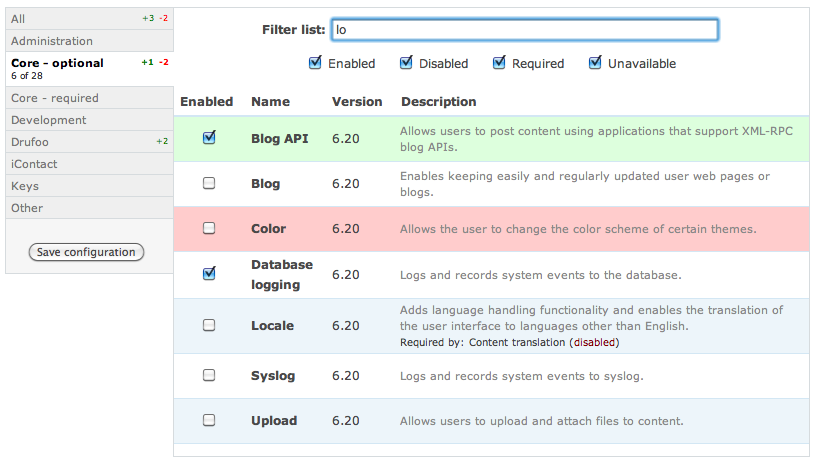
Module filter
http://drupal.org/project/module_filter
This module helps you manage modules more easily by allowing you to search and filter them.
Now let’s download the Commerce module.
Commerce
P.S: This article is unfinished because the full guide is here: