
-
EBT Blocks 🧱
-
EPT Paragraphs 🆕
-
Resources & Support
- Drupal Book
- Blog
- Case Studies
- Drupal Documentation
- JSON Drop API Documentation
- Forum
- What's New
- Download Drupal
- Contact
Extra Block Types (EBT) - New Layout Builder experience❗
Extra Block Types (EBT) - styled, customizable block types: Slideshows, Tabs, Cards, Accordions and many others. Built-in settings for background, DOM Box, javascript plugins. Experience the future of layout building today.
❗Extra Paragraph Types (EPT) - New Paragraphs experience
Extra Paragraph Types (EPT) - analogical paragraph based set of modules.
GLightbox is a pure javascript lightbox (Colorbox alternative without jQuery)❗
It can display images, iframes, inline content and videos with optional autoplay for YouTube, Vimeo and even self-hosted videos.
GET, POST, PATCH and DELETE
JSON Drop API Documentation
- Installation JSON Drop API
-
JSON:API backend
- JSON:API Server Endpoints Documentation
- Core Concepts
- Glossary of Terms
- Filtering
- Includes
- Pagination
- Sorting
- Revisions
- Translations
- GET, POST, PATCH and DELETE
- Fetching resources (GET)
- Creating new resources (POST)
- Removing existing resources (DELETE)
- Updating existing resources (PATCH)
- Customizing Resources
- File Uploads
- How to Use the Webform REST Module with Drupal 11: A Practical Guide
- JSON:API vs. core's REST module
- What JSON:API DOESN'T do
- JSON:API Extras
- Content Management in JSON Drop API
- Translation User Interface, Configuration, and Content
- Authentication, Security & Performance
This section contains examples and information per request type: GET, POST, PATCH and DELETE
About the examples
All examples are working examples that you can try either in a browser or a JSON client (for example: Postman). You need a standard Drupal installation, a number of Article nodes and the JSON:API module enabled.
http://example.com/jsonapi/node/article/{{article_uuid}}
All requests use the '/jsonapi' path prefix, which is the default value of the JSON:API module. In various examples placeholders are denoted by a double curly brace syntax, eg. {{...}}. Replace them with the designated data applicable for your environment.
To allow POST, PATCH and DELETE operation, visit
/admin/config/services/jsonapi
and check the "Accept all JSON:API create, read, update, and delete operations." option.
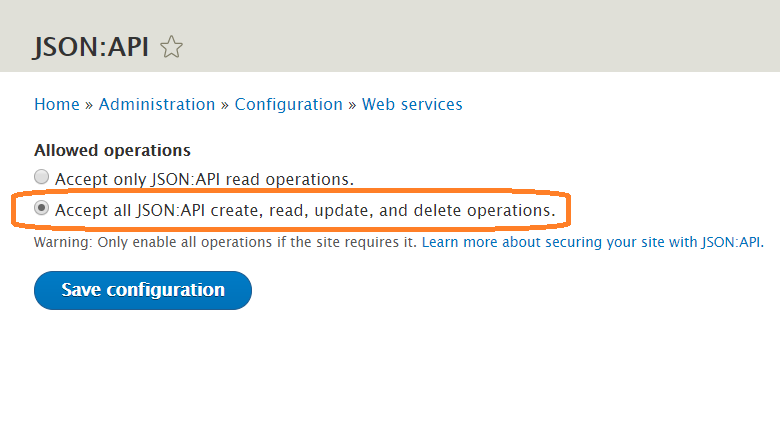
Article from Drupal Documentation.