
PHP Lessons - Lesson 8 - The if statement
Quite often, depending on circumstances, we have to make decisions. In programming—just like in life—actions depend on conditions. In life we use our head to make decisions, in PHP we use the if statement. For example: if it rains, I’ll take an umbrella; if it’s warm, we’ll go to the beach. In PHP, we evaluate expressions for truth and perform actions accordingly:
<?php
if (condition) {
  // Action
}
?>
Here’s a flowchart to illustrate how if works:
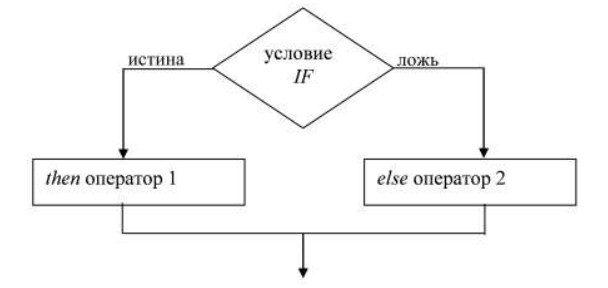
Simple Example
<?php
if (5 > 3) {
  print '5 is greater than 3';
}
?>
Comparison Operators
Equal to (==)
<?php
$x = 5;
if ($x == 5) {
  print 'x is equal to 5';
}
?>
Not equal to (!=)
<?php
$x = 5;
if ($x != 4) {
  print 'x is not equal to 4';
}
?>
Greater than (>)
<?php
$x = 6;
if ($x > 4) {
  print 'x is greater than 4';
}
?>
Less than (<)
<?php
$x = 1;
if ($x < 3) {
  print 'x is less than 3';
}
?>
Greater than or equal to (>=)
<?php
$x = 5;
if ($x >= 5) {
  print 'x is greater than or equal to 5';
}
if ($x > 5) {
  print 'x is greater than 5'; // not printed
}
?>
Less than or equal to (<=)
<?php
$x = 5;
if ($x <= 5) {
  print 'x is less than or equal to 5';
}
if ($x < 5) {
  print 'x is less than 5'; // not printed
}
?>
Combining Conditions
Use && for AND (both conditions must be true), and || for OR (at least one must be true).
AND (&&)
<?php
$x = 4;
$y = 5;
if ($x == 4 && $y == 5) {
  print 'x is 4 and y is 5';
}
if ($x == 3 && $y == 5) {
  print 'x is 3 and y is 5'; // not printed
}
?>
OR (||)
<?php
$x = 4;
$y = 5;
if ($x == 4 || $y == 5) {
  print 'x is 4 or y is 5<br />';
}
if ($x == 3 || $y == 5) {
  print 'x is 3 or y is 5<br />';
}
if ($x == 4 || $y == 6) {
  print 'x is 4 or y is 6<br />';
}
?>
Using Boolean Values
Remember the
booleantype? It's used inifstatements to testtrueorfalsevalues.<?php $condition = true; if ($condition) { print 'Hello, World!'; } ?>
Using else
<?php
if (5 > 6) {
  print 'Five is greater than six';
} else {
  print 'That’s impossible!';
}
?>
Using empty(), !, and isset()
<?php
$x = 10;
if (empty($x)) {
  print 'x is empty';
} else {
  print 'x has value ' . $x;
}
?>
<?php
$x = 10;
if (!empty($x)) {
print 'x has value ' . $x;
} else {
print 'x is empty';
}
?><?php
$x = '';
if (empty($x)) {
print 'x is empty<br />';
}
if (isset($x)) {
print 'x exists';
}
?>That’s enough for this lesson. Now you know how to use if in PHP.